ENV & Capabilities
Here at Ansi.md we love COLOR and use it as much as possible. As such, there are three questions that cli apps need to answer:
- Does the user even WANT color? Often the answer is no, like when piping to a file.
- HOW MANY colors can the terminal handle? (16/256/16M)
- If we turn on color, is the user's terminal DARK or LIGHT? The last thing we want is white text if the user has a light background.
This is a colossal pain, so so so complicated, and flat out byzantine. We stand on the shoulders of giants and they tickle us relentlessly. I hesitate here because I find it difficult to begin...
Does the user WANT color?
Your app is running, your hard work paid off, you have real users. Important question, does the user want to turn on color output or should we stick with black and white? Handy overview:
-
Is stdout a tty? - If stdout is a tty, the user is NOT redirecting to a file or piping to another command. Sorry for the double negatives, but if stdout isn't a tty you may want to turn color off. Every language and library has a helper for this, you just gotta look for it. Note that some apps might choose to leave color on anyway (like my tennis app). The user asked for a beautiful table, so I leave color on even if they pipe output into less.
-
$FORCE_COLOR=1 or $NO_COLOR=1 - I like to honor these env vars, they are easy for users to understand and easy for me to implement. If you google this exciting topic you might encounter descriptions of env vars like
$CLICOLOR,$CLICOLOR_FORCE. In my experience these are infrequently used and suffer from an excessive number of edge cases. What happens if they are set, but empty? What if$CLICOLORis set to 0? Your LLM will repeatedly flag these edge cases as major issues but I can't find anyone who cares. Personally I think FORCE_COLOR/NO_COLOR are much more important than CLICOLOR/CLICOLOR_FORCE. -
--color, --no-color, --color=on|off|auto|yes|true|false, --color=yup, etc. - You might need these, depends on the app. My rule of thumb is that fun, display-oriented apps can skip these flags. Party poopers can use
$NO_COLOR=1to suck the fun out of the terminal. I'm also not a fan because I can never recall which apps use--color=onand which use--color=trueor--colorall by itself. -
Config precedence -
--flags>$env> defaults/is_tty. So if your app is running with both$NO_COLOR=1and--color=on, turn color on.
Luckily, there are excellent libraries to help tackle this complexity.
HOW MANY colors (16/256/16M)?
Sometimes referred to as ANSI bit depth or color profile detection.
| # of colors | nick | what? |
|---|---|---|
| 16 | "ansicolor" | The classic 16 ANSI colors. Black, Red, Green, Yellow, Blue, Magenta, Cyan & White plus the bright variants. Wily users employ terminal themes to remap these to a more pleasing palette, like catppuccin. Your app has zero control over the actual colors, jokes on you! |
| 256 | "colorcube" | Eventually our ansi overlords decided to expand to 256 colors. The 256 colors are cleverly derived from an algorithmic color cube. This is a huge improvement and you can often build great apps that only use these colors. |
| 16 mil | "truecolor" | Yes, full RGB in your terminal. Some apps like to crank it up to 11. I recently wrote a ridiculous cli that loops a short video on the intro screen, truecolor required! |
I have a whole separate page on color design, let's focus on detection here. Your app is running, does the terminal support 16, 256 or 16M colors? If you want to really go down the rabbit hole, give terminfo a quick scan, it's only 1,700 lines long.
Or take a look at Ghostty's valiant attempt to stuff a custom entry into terminfo on the fly. Some inside baseball here. When you ssh to a new host, ghostty attempts to update the terminfo database on that machine to teach it a bit about ghostty. This even works sometimes!
In 2026 all popular terminals support at least 256 colors, and the vast majority support 16M. If you can squeeze into 256 colors, just stop here. Be sure to read the colors page, though, because you absolutely must understand (and probably avoid) the first 16 colors. I digress.
Sadly there are still a few exotic laggards like Windows Terminal, GitLab CI, etc. The worst offender was probably Apple Terminal, which added support for truecolor as part of the 2025 Tahoe release. Yes, the cursed Liquid Glass release also upgraded Terminal to support 256³ colors. As usual, don't ask me about Windows unless you want to hear an ignorant rant.
The easiest way to detect 16M is to look for $COLORTERM=truecolor. The terminal will kindly set this for your app to notice. Unfortunately this lovely env variable can easily get lost when using ssh, tmux, etc. We've lost $COLORTERM. How does crossterm handle this important case? This comment sums up the situation:
/// This does not always provide a good result.
pub fn available_color_count() -> u16 {
    ...
}
Charm is more thorough, first pouncing on $COLORTERM, then sniffing $TERM for known terminal names, and finally checking the venerable terminfo database as a final, desperate resort.
My take: if you want full 16M, try to use ansi libraries that automatically detect and/or downsample to 256. Or you can ignore legacy terminals entirely and wait until someone complains. I actually moved tennis to 256 colors the first time I got a complaint from someone on an intel mac. Nobody noticed this massive change.
DARK or LIGHT?
Does your terminal have a light or dark background? If you decide to venture beyond the first 16 ansi colors, this is a high stakes question. Get it wrong, your app looks bad. Not to pick on eza, but it can look like this:
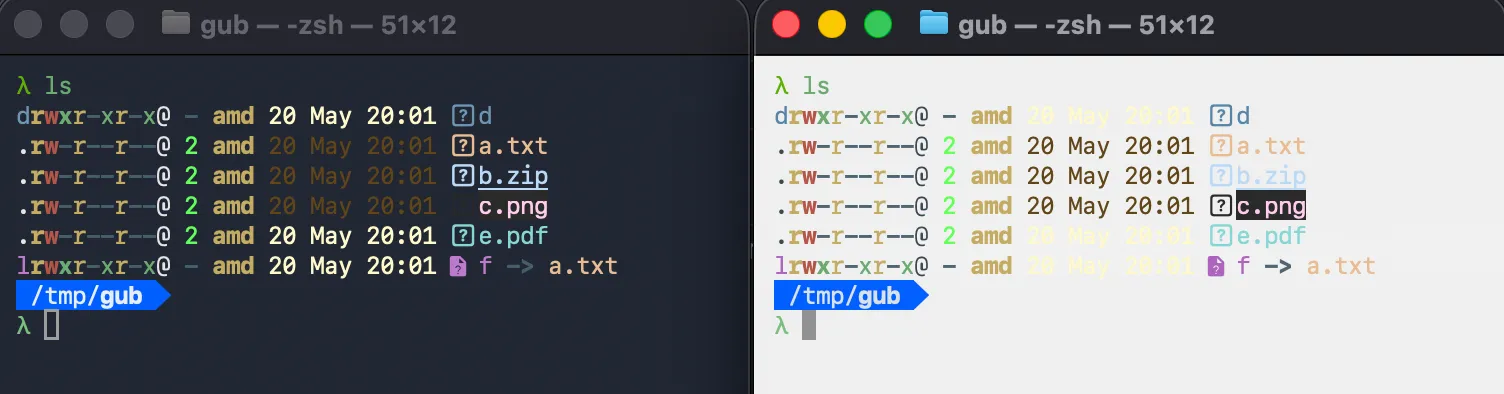
Luckily, it's quite easy to detect the terminal background color. Just put the fd in raw mode, run an OSC 11 query to get the background rgb color, calculate luma to determine "light" vs "dark" and you are all set! There are some minor wrinkles, of course, like not borking the terminal if it doesn't support OSC 11 for some reason. Easy fix - Send a Ps 6 cursor position query, which generates a response in almost all terminals (even the ones that don't support OSC 11). Don't forget to exit raw mode, or the terminal never recovers. You may also want to set a timeout when reading from the raw console (VTIME), though many languages don't expose that API. One additional complication, you can easily exceed this timeout if the user is running over ssh. Whoops. Also, for best results run this trivial check on /dev/tty when available.
I implemented this in ruby and I kid you not it's one of the hairiest things I've ever attempted. I ported it to zig in a fit of rage. Don't even get me started on testing or watchexec, ha ha ha ha!
The real answer here is to use a library. Also, don't listen to your LLM when it says "this is easy to implement".
| lang | lib |
|---|---|
| go | termenv or lipgloss |
| javascript | os-theme, maybe? |
| python | rich #1170 "... it is impossible" |
| ruby | table_tennis (apologies in advance) |
| rs | termbg |
| zig | tennis zig (apologies in advance) |
$COLORTERM Breakdown
On my machine I have an innocuous dir called lib, which houses the assortment of oss projects I looked at for this guide. If I search for $COLORTERM in there we can see all the various ways that people try to sniff term color support. Let's take a quick peek, shall we? Chicken emoji below means I've used and enjoyed. 🐔
| lib | lang | ⭐ stars | $CLIxx | $FORCE/$NO | $CI | $TERM sniff |
|---|---|---|---|---|---|---|
| 🐔 colorprofile | go | 125 | yes | - / y | - | extensive |
| 🐔 termenv | go | 2k | yes | - / y | yes | extensive |
| colorama | python | 4k | - | - / - | - | - |
| colored | python | - | - | y / y | - | - |
| rich | python | 57k | - | y / y | - | a bit |
| 🐔 anstyle | rust | 170 | yes | - / y | yes | a bit |
| colored | rust | 2k | yes | - / y | - | - |
| console-rs | rust | 1k | yes | - / y | - | a bit |
| crossterm | rust | 4k | - | - / y | - | a bit |
| supports-color | rust | 54 | yes | y / y | yes | a bit |
| ansis | js | 505 | - | y / y | yes | a bit |
| @colors/colors | js | 106 | - | y / - | yes | extensive |
| colors-cli | js | 79 | - | - / - | - | a bit |
| kolorist | js | 321 | - | y / y | yes | a bit |
| supports-color | js | 372 | - | y / - | yes | extensive |
Don't read too much into the table above, this is not about completeness. IMO much of this detection is legacy since many older terminals have, uh, left us. Footnotes on the above:
- All of these libraries look at
$COLORTERMandis_tty. colorprofilegets extra credit for trying to useterminfo.- I consider
$CLICOLOR&$CLICOLOR_FORCElegacy and I haven't seen them in the wild. - "$TERM sniff" is when the library looks at
TERMand/orTERM_PROGRAM. For example,colorprofilelooks forweztermand many others in there. Some libraries also have Windows-specific checks for things likeConEmu. To which I say, who cares.
See Also
If you google ansi truecolor, you'll find these three pages - TrueColour.md gist, which moved to termstandard/colors, and
the kurahaupo gist which is a fork of the first gist. Lots of good info, though I ding all three for failing to notice that the main offender (Apple Terminal) finally added support for truecolor in 2025. Also see the terminfo section on my Advanced page.